
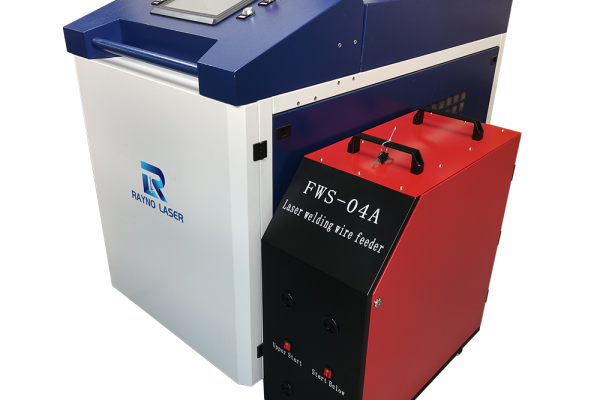
As more customers choose high-power 6kW handheld laser welding machines, knowing how to correctly set up and operate the equipment has become increasingly important. A proper setup helps users understand the machine, configure the welding system correctly, and get more consistent welding results.
Rayno Laser has prepared a series of operation videos covering some of the most important steps, including initial startup, welding focus adjustment, and switching the machine to laser cleaning mode.
Before You Start: Read the User Manual First
The first step after receiving your 6kW handheld laser welding machine is to carefully read the equipment user manual.
The user manual is the primary reference for machine installation, electrical connections, operation, parameter settings, safety requirements, and maintenance. Users should not rely on this article or the accompanying videos as a replacement for the official equipment manual.
This article and the videos provided below are intended to serve as supplementary operating guidance, helping users better understand some of the basic procedures and common operation steps.
Because a 6kW laser welding machine is high-power laser equipment, always follow the specific instructions supplied with your machine and make sure the operator understands the required laser safety procedures before operation.
Important: Machine configurations can vary depending on the laser source, control system, welding head, wire feeder, cooling system, and other options. Always refer to the user manual supplied with your specific Rayno Laser machine for detailed operating instructions.
Rayno’s current 6000W handheld laser welding machine uses a 6000W fiber laser, water cooling, and can be configured with different laser-source and wire-feeding options.
1. How to Turn On the 6kW Laser Welding Machine After Receiving It
After reading the user manual, the next step is to understand the basic startup procedure.
Before operating the machine, users should become familiar with the main machine components and confirm that the required connections have been completed according to the manual.
The startup process generally involves checking the machine connections, cooling system, laser welding head, power supply, shielding gas system, and other relevant components before switching the equipment into operating mode.
For first-time users, this can be one of the most confusing stages. Rather than relying only on written instructions, Rayno Laser has prepared a dedicated video showing the startup process.
Watch the Video
How to Turn On the 6kW Laser Welding Machine After Receiving It
This video is intended as a visual supplement to the machine manual, helping users understand the sequence more easily.
2. How to Set the Correct Focus Point for Welding
Once the machine has been started correctly, the next important step is welding focus adjustment.
Focus position has a direct influence on the laser energy delivered to the workpiece. An incorrect focus position can affect penetration, weld appearance, welding stability, and overall processing results.
For this reason, users should understand how to find and adjust the appropriate focus position before starting actual production work.
Rayno Laser has prepared a dedicated video demonstrating how to set the focus point for the welding system.
Watch the Video
How to Set the Focus Point for the Welding System
The video provides a visual reference for users who are learning how to adjust the welding focus for the first time.
3. How to Switch the 6kW Laser Welding Machine to Cleaning Mode
Some Rayno handheld laser welding systems are designed with multiple processing functions, allowing the same equipment to be used for applications such as welding and laser cleaning, depending on the specific machine configuration.
Rayno’s 6kW handheld laser welding machine is designed for demanding industrial welding applications, while Rayno also offers multi-function handheld systems that integrate welding and cleaning functions.
If your machine is configured to support laser cleaning, it is important to understand how to correctly switch the system from welding mode to cleaning mode.
Rayno Laser has prepared a separate operation video demonstrating this procedure.
Watch the Video
How to Set the 6kW Laser Welding Machine to Cleaning System
Again, this video should be used together with the machine’s official user manual rather than as a replacement for it.
4. Why We Recommend Using the Manual and Videos Together
For a new 6kW laser welding machine user, written instructions and videos serve different purposes.
| Resource | Main Purpose |
|---|---|
| User Manual | Official operating, installation, safety, parameter, and maintenance reference |
| Operation Videos | Visual demonstration of selected operating procedures |
| Technical Support | Assistance when users encounter configuration or equipment-specific issues |
The user manual should always come first. The videos can then make certain procedures easier to understand visually.
This approach is particularly useful for new operators who may understand the written instructions but still have questions about what a particular operation should look like in practice.
From Receiving the Machine to Starting Production
For new 6kW handheld laser welding machine users, we recommend following this basic learning sequence:
Step 1: Read the complete user manual.
Step 2: Understand the machine configuration and major components.
Step 3: Check the machine according to the manual before operation.
Step 4: Watch the Rayno startup video.
Step 5: Learn how to set the welding focus correctly.
Step 6: Perform welding tests using appropriate parameters and workpiece conditions.
Step 7: If the machine supports laser cleaning, learn how to switch to and operate the cleaning system.
Step 8: Refer to the manual and contact Rayno technical support if you encounter an equipment-specific issue.
This sequence helps separate official operating requirements from supplementary visual guidance, making the training process clearer for new users.
Frequently Asked Questions
Do I need to read the manual before watching the operation videos?
Yes. The user manual should be the first reference after receiving the machine. The videos in this article are supplementary guides designed to help users understand selected operating procedures visually.
Can the videos replace the 6kW laser welding machine manual?
No. The videos do not replace the official manual. Different machine configurations may have different components, control systems, laser sources, and operating requirements.
Why is welding focus adjustment important?
The focus position affects how the laser energy is delivered to the workpiece and can influence welding penetration, weld appearance, and process stability.
Can a 6kW handheld laser welding machine also perform laser cleaning?
This depends on the specific machine configuration and functions included with the system. Users should check their machine’s manual and configuration before attempting to switch operating modes. Rayno also offers multi-function handheld laser systems with welding and cleaning capabilities.
Learn the Machine Before You Start Production
A 6kW handheld laser welding machine provides substantially higher laser power than conventional lower-power handheld systems, so correct setup and operation should not be overlooked.
The best starting point is simple:
Read the manual first. Learn the machine configuration. Then use Rayno Laser’s operation videos as supplementary guidance.
From initial startup and welding focus adjustment to switching between supported processing modes, these resources are designed to help users become more familiar with their equipment and operate it more confidently.
For machine-specific questions, parameter selection, or technical problems, users should refer to the official documentation and contact the Rayno Laser technical support team.